
IT security has always played a very critical role in the functioning & management of IT Infrastructure. However, the rapid technological progress we have seen in the last decade or so, has brought the world of security to the forefront. The positioning of a robust IT Security framework with sufficient checks & balances has changed from “good to have” to a “must have”. Nowadays, it’s not a rare sight to see IT Security teams leading the charge on what is or isn’t allowed to deploy in the infrastructure. It is also not uncommon to see organizations making sure that their IT Security teams are armed to the teeth with the latest & greatest technical tools with capabilities to scan almost everything under the sun from IP Phones to Hypervisors to servers & so on. If you work for such an organization then you have the option to outsource your headaches of identifying security vulnerabilities pertaining to your applications like Cisco Unified Communication applications (CUCM), to the IT Security team. However, if you belong to either one of the following categories then tag along and work your way up to build a custom solution for yourself.
- Your IT Security team doesn’t have the necessary tools to scan UC appliances.
- Your IT Security team has the necessary tools but those tools lack the ability to provide a coherent & usable output.
Use Case
As always, my preferred method of sharing anything is through a practical use case. The use case, in this context, is to identify security vulnerabilities in the Cisco CUCM product. I am using CUCM as an example for demonstration purposes only. You can do it for practically any Cisco application.
Objective : Complete end to end automation of security vulnerability identification, collection and reporting process for Cisco CUCM Product. I’ll also upload the code on github at the end of this two part series.
Stages : This tutorial is divided into two stages. Stage 1 includes Vulnerability Identification & Collection. Stage 2 is Reporting that includes the integration with Service Now for ticketing & reporting purposes. We will cover stage 2 in the next post.
Main Players:
- Cisco PSIRT Vulnerability API
- OAuth 2.0 Framework for authentication & authorization
- Python Request library for REST communication and Openpyxl library for data management in MS Excel
- Service Now for ticket and documentation (Cherry on the cake 🙂 )
Part 1 : Vulnerability Identification & Collection
Register an app with Cisco
This process is already explained in one of my earlier posts. If you don’t already know how to register an app on Cisco’s API console then please have a look at the following link.
https://learnuccollab.com/2022/10/23/demystifying-oauth-2-0-part-2-learning-the-ropes-with-postman/
Declaring variables with predefined values

- You will get the Client ID and password once you register an app on Cisco’s API console.
- Token URL is Cisco’s Authorization server.
- Last thing you need is the Cisco’s PSIRT API specific to CUCM product.
Getting a token through OAuth 2.0
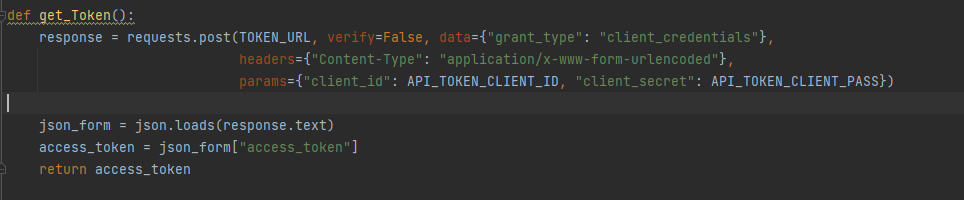
This function will send a POST request to the Cisco’s Auth server with Client ID and Password as its payload and get a Token in return.
Getting details of all vulnerabilities pertaining to CUCM

If you print the output of variable “cucm_Advisories” at this point, you will see a bunch of data that might not even be very useful to you. The API will throw every single CUCM vulnerability available to it and that is not an ideal position to be in. I can think of a bunch of issues right away.
For instance, the data returned might include old information which is not quite useful as of today. If the output contains vulnerabilities from as far back as 2016, which you don’t quite need then are you ready to dedicate a whole other chunk of time just to remove those older vulnerabilities so that you can isolate the ones identified in 2023 ?
The good thing is that we don’t have to!! We can program our way into simplifying it.
Working with Spreadsheets
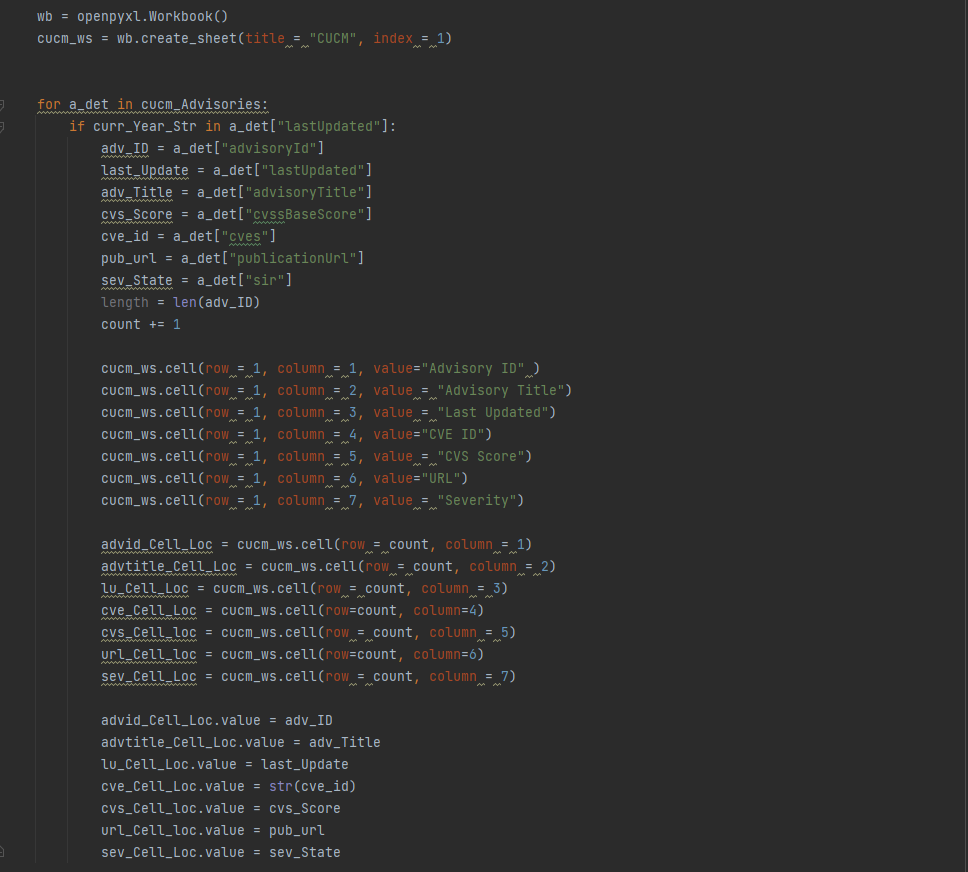
In the following screenshot, we are performing following tasks
- Using Openpyxl library
- Creating a new Workbook using Openpyxl’s Workbook method.
- Running a “For” loop to go over the Dictionary values we received as a part of the previous REST GET request
- Within the loop, a check is being run on the “Last Updated” date. The objective is to capture only those vulnerabilities that are last updated in 2023. If you are managing your systems today in 2023 then it’s unlikely that you would be looking at vulnerabilities from 2020. If you are then that’s a whole different discussion that, perhaps your management needs to have with you 😛
- Different columns are being built with “headings” that we are interested in. We are capturing following parameters. You can add or remove depending upon your preference.
- Advisory ID
- Advisory Title
- Last Updated
- CVE ID
- CVS Score
- URL
- Severity
Saving the MS Excel file
The final stage involves saving the file. You can give it any name. In my example below, I chose to name it in DD-MM-YYYY format.

Final Output
At the end of this exercise, you should have an excel file that looks like this

This concludes the Identification & Collection phase of this exercise. In the next post, we will take it a notch further and integrate this program with Service Now by creating a ticket & adding this prepared excel file to the ticket as an attachment. That should cover the Reporting aspect of this workflow.
I hope this was helpful to those who are trying to build an inhouse capability to identify & gather information on security vulnerabilities plaguing their Unified Communications environment powered by Cisco CUCM. Please feel free to provide your feedback/suggestions, if any.
 Learn UC Collaboration