
In the last few posts, we have gone through the basics of OAuth2.0 framework and how one can use tools like Postman to understand the interaction between applications and APIs that require OAuth2.0 based authentication/authorization. In today’s concluding part of this series, we will be writing some code in Python that would accomplish the use case we had outlined in the last post. If you haven’t gone through Part 1 and Part 2 of this series, then please do so first. Otherwise, a lot of stuff explained in this post will not make much sense. Secondly, it is assumed that you already have some basic understanding of Python data types likes Lists, Dictionaries etc, APIs, different payload formats like JSON and XML. If you want to jump straight to the Github repository and download the code then click on point# 8 below.
So, without much ado, let’s dive right into it!!
The table of contents is listed below. You can click on the link to get to relevant sections
- Use Case
- Declaring the Variables and loading them with values
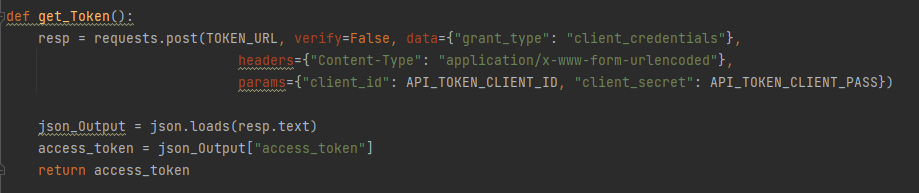
- Get the Token
- Send a request to the API
- Output (IOS Display name and Image name)
- Prettifying the Output
- Prettified Output
- Github Repository
Use Case
- Objective : Get recommended software suggestion for Cisco 4431 router
- Authorization Type : OAuth 2.0
- URI : https://api.cisco.com/software/suggestion/v2/suggestions/software/productIds/ISR4431-SEC/K9-RF
- Additional Headers : None. We will use the default ones.
Some of the common libraries we will be using in our program are
- Requests : To communicate over REST standard.
- Tabulate (Optional)
- JSON : To convert data into JSON format.
At the end of the exercise, we should be looking at something like the following. This table lists the IOS-XE image recommended by Cisco for 4431 series router platform along with its release date.

In the last post, we had gone through the process of registering an app on Cisco’s API console. At the end of that process, we had received two values called “Client ID” and “Client Secret”. We will be utilizing those values in our program to interact with the Cisco API. If you haven’t checked that article yet, then please do that first.
Declaring the Variables and loading them with values

Get the Token
Send a request to the API

Output (IOS Display name and Image name)
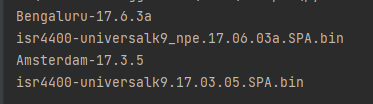
That’s it!! You now know what Cisco’s recommendation vis-a-vis IOS-XE release is for 4431 series routers.
Prettifying the Output
As far as the initial objective of interacting with Cisco’s OAuth2.0 based API is concerned, we have already met it. We built the request, sent it and got the response.
However, if you want to add additional bells & whistles to it and prettify the output so that it is presented in a user friendly tabular format then you can add the following pieces to the code
Create couple of empty Lists/Arrays and initialize one of them with values that you’d want as a heading. This should be done at the global level.

Modify the loop by adding following code to it. We are basically inserting values into the “List” we had created earlier. With each iteration of the For loop, we are inserting & positioning the elements into the list.
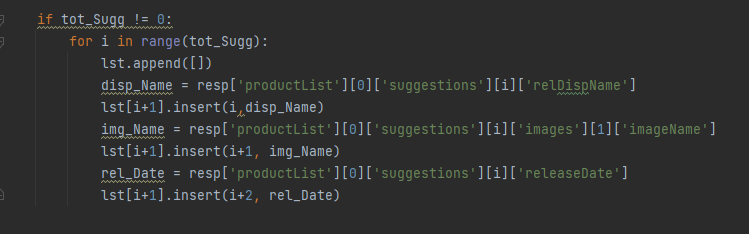
Use Tabulate library to encapsulate the data into a tabular format with borders etc.

Prettified Output
Github Repository
If you want to download this code sample and customize and use it for your own specific production environment, then head over to the following link
https://github.com/simranjit-uc/Cisco-Software-Suggestion-Python
I hope this post was helpful in demonstrating the real world use of OAuth2.0 framework in conjunction with one of the popular Cisco APIs. This shows how we can leverage the power of APIs to automate and simplify some of the common production use cases.
Please feel free to drop your feedback/suggestions, if any. Happy Learnings!!
 Learn UC Collaboration