
In the last few posts, we have kept our focus on LLMs and Model Context Protocol, especially on their application in the Unified Communications technology space. This post will extend our ongoing dicusssion even further by incorporating an LLM/MCP powered Agent into a ServiceNow driven workflow which involves troubleshooting Voice related issues.
Enterprise voice environments are complex, fragile, and often opaque to troubleshoot. Traditional troubleshooting relies heavily on human intuition, static runbooks, and repetitive diagnostic steps. This leads to longer resolution times, inconsistent outcomes, and unnecessary escalations to higher support tiers.
But what if we could automate initial L1 troubleshooting using an intelligent, tool-augmented AI agent?
In this blog, we’ll walk through how to design and implement a Voice Troubleshooting Agent for one specific use-case using:
- Agentic AI (LLM powered reasoning)
- Python Django based MCP Client & FastMCP for tool orchestration
- Cisco CUCM APIs for real-time diagnostics
- ServiceNow for ticket ingestion
- The Problem with Traditional L1 Voice Support
- Agentic AI for Voice Troubleshooting
- High-Level Architecture
- End-to-End Request Flow (Detailed)
- Designing the Agent: From Chatbot to Engineer
- Real-World Benefits
- YouTube Explanatory Video
The Problem with Traditional L1 Voice Support
L1 engineers typically handle issues like:
- Move, Add, Change, Delete work
- Standard configuration checks for issues like
- Calls not reaching destination
- Voicemail failures
- Device registration issues
The process often includes:
- Reading ticket details
- Interpreting user intent
- Running manual checks
- Escalating to higher tiers if unsure
This approach has several limitations:
- High dependency on human interpretation
- Inconsistent troubleshooting paths
- Time-consuming repetitive checks
- Over-escalation to L2/L3 teams
Agentic AI for Voice Troubleshooting
Agentic AI systems go beyond simple chatbots. They can:
- Understand user intent
- Decide which tools to use to accomplish the task
- Execute actions
- Interpret results
- Iterate toward resolution
In our case, the agent behaves like a virtual L1 support engineer.
High-Level Architecture
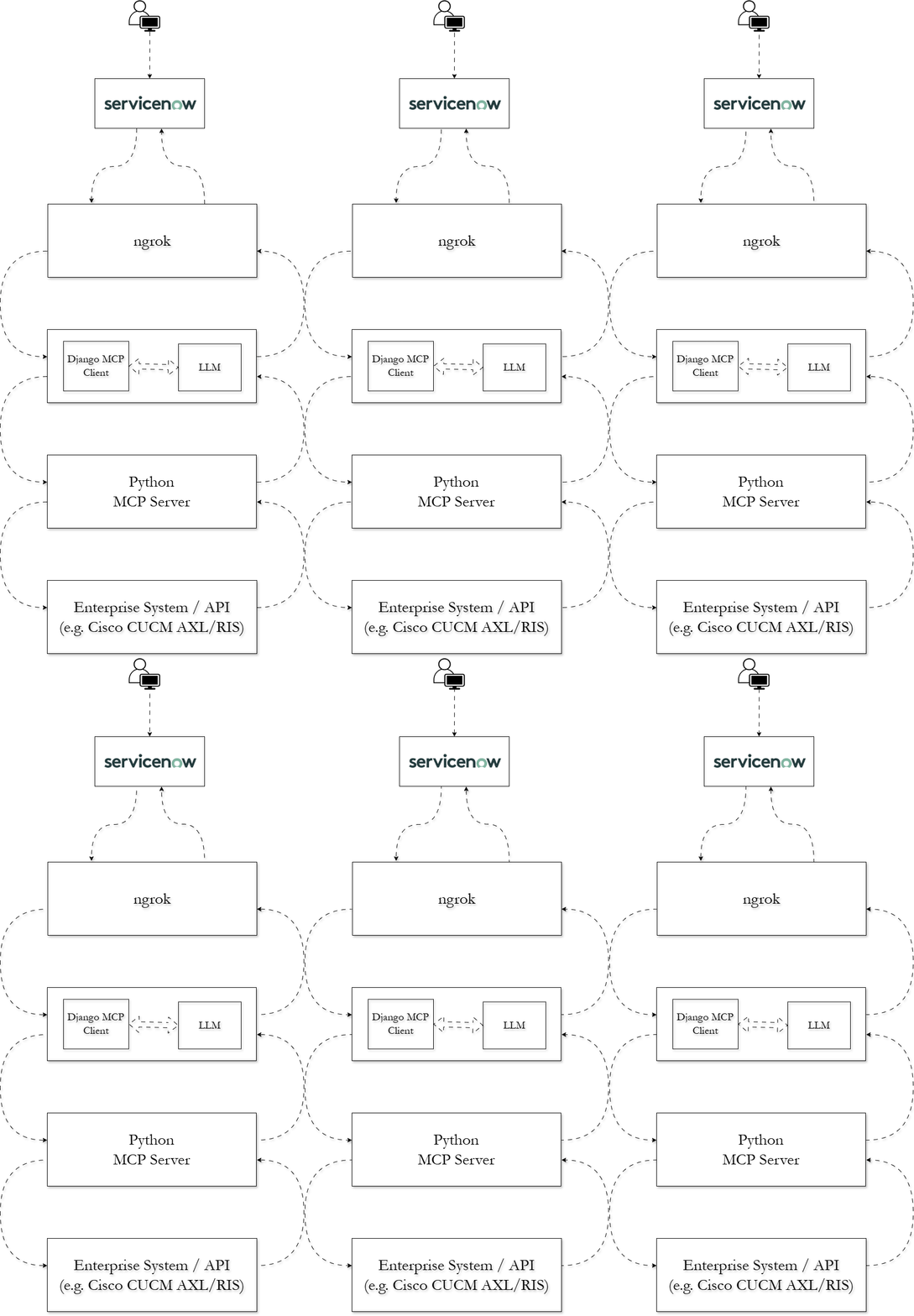
Here, I’ll be explaining & demonstrating a sample Agent that can work as an L1 engineer. It will go through a ServiceNow ticket, interpret its contents and take appropriate actions to perform the first layer of troubleshooting. It will do so by invoking necessary tools being exposed an MCP server.
Please note that this is just a small example to showcase how powerful this whole MCP/LLM ecosystem can be for deployment in real production environments.
End-to-End Request Flow (Detailed)
Let’s trace a real request through the entire workflow.
Example Input
User opens a ticket in ServiceNow
“Calls to extension 1234 are not going to voicemail”
Step 1: ServiceNow initiates an outbound API request
ServiceNow initiates an outbound POST request to ngrok endpoint that’s exposing our local on-prem django web server to the internet.
This is done by creating a Business Rule in ServiceNow which gets triggered as soon as the ticket is submitted in ServiceNow.
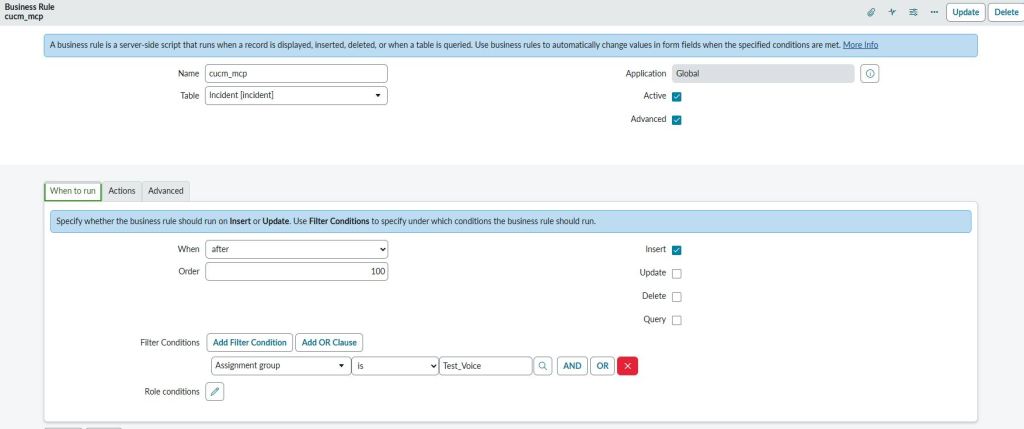
The following JavaScript code sends a POST request to the ngrok endpoint
(function executeRule(current, previous /*null when async*/) {

	// Add your code here
	var r = new sn_ws.RESTMessageV2();
   	r.setEndpoint("https://<NGROK Endpoint URL>/");
   	r.setHttpMethod("post");
   	r.setRequestHeader("content-type","application/json");

	var desc = current.getValue("short_description");
	var number = current.getValue("number")
	var sys_id = current.getValue("sys_id")
	var obj = {"number" : number, "sys_id" : sys_id, "short_description" : desc};

	var body = JSON.stringify(obj);
	r.setRequestBody(body);

	var response = r.execute();

})(current, previous);
Step 2: Ingress via ngrok
ngrok exposes our local Django web server to the internet. Run the following command
ngrok http 8000
This gives you a public endpoint like the following. Add this public endpoint to the Javascript code given above.
Forwarding https://<ngrok-URL> -> http://localhost:8000
Step 3: Agent Core in Django (MCP Client + LLM Intent Parser)
Our Django layer is the brain of the system.
It performs:
- Intent classification
- Entity extraction
- Tool orchestration via MCP
- Final response generation
Intent Classification & Entity Extraction
import json
import httpx, cohere

class IntentParser:
    """
    Converts natural language into MCP tool calls.
    """

    def __init__(self, api_key: str, model: str = "command-a-03-2025"):
        self.client = cohere.ClientV2(api_key)
        self.model = model

    async def parse(self, user_text: str):
        """
        Returns:
            tuple: (tool_name, arguments_dict)
        """

        prompt = f"""
        You are a CUCM assistant.

        User question:
        "{user_text}"

        Your task:
        1. Decide which MCP tool to call
        2. Decide the arguments (if any)

        Available tools:
        1) vm_Check_Tool
           - Use this tool when the user is reporting about calls failing to go to voicemail.
           Do not use this tool for any other purpose.
           - Arguments:
                - extension : This is a 4 digit extension

        Rules:
        - Choose exactly ONE tool
        - If the chosen tool takes no arguments, return an empty object: {{}}
        - Return ONLY valid JSON

        Return format:
        {{
        "tool": "<tool_name>",
          "arguments": {{...}}
        }}
        """

        response = self.client.chat(
            model=self.model,
            messages=[{"role":"user", "content": prompt}],
            max_tokens=200,
        )

        # Extract text
        raw_MSG = "".join([c.text for c in response.message.content])
        raw_MSG = raw_MSG.strip()
        raw_MSG = raw_MSG.lstrip("```json").lstrip("```").rstrip("```").strip()

        try:
            payload = json.loads(raw_MSG)
            return payload["tool"], payload["arguments"]
        except:
            return "lookup_Phone_Tool", {"device_model": None}
Tool Orchestration & Final Response
import json, requests, json
import os, logging, datetime
from pathlib import Path
import httpx, asyncio
from django.http import JsonResponse
from django.views.decorators.csrf import csrf_exempt
from .intent_Parser import IntentParser
import json, re

BASE_DIR = Path(__file__).resolve().parent
CONFIG_PATH = BASE_DIR / "config.json"
LOG_FILE = BASE_DIR / "MCP-CUCM.log"

logging.basicConfig(filename=LOG_FILE, level=logging.INFO)
logger = logging.getLogger(__name__)

with open(CONFIG_PATH, "r") as file:
    data_JSON = json.load(file)
    COHERE_API_KEY = data_JSON["COHERE_API_KEY"]
    WEBEX_BOT_TOKEN = data_JSON["WEBEX_BOT_TOKEN"]
    BOT_EMAIL = data_JSON["BOT_EMAIL"]

MCP_SERVER_URL = "http://localhost:3333/mcp"  # FastMCP HTTP endpoint
SNOW_URL = "https://<ServiceNow FQDN>/api/now/table/incident/"
SNOW_TOKEN_URL = "https://<ServiceNow FQDN>/oauth_token.do"

parser = IntentParser(COHERE_API_KEY)

@csrf_exempt
async def snow_INC(request):
    raw_data = request.body.decode('utf-8')
    message_data = json.loads(raw_data)
    message_number = message_data.get("number")
    message_id = message_data.get("sys_id")
    message_text = message_data.get("short_description")
    if not message_text:
        return JsonResponse({"status": "ignored"})

    # Asking LLM to extract context & determine what MCP tool to call
    try:
        tool_name, tool_args = await parser.parse(message_text)
    except:
        print("Unable to parse tool details")
        logger.info(f"{str(datetime.datetime.today())} : LLM failed to parse the message and unable to determine required MCP tools")


    headers = {
        "Content-Type": "application/json",
        "Accept": "application/json, text/event-stream"
    }

    try:
        async with httpx.AsyncClient(timeout=30) as client:
            # Preparing MCP POST Payload
            mcp_request = {
                "jsonrpc": "2.0",
                "id": 1,
                "method": "tools/call",
                "params": {
                    "session": "default",
                    "name": tool_name,
                    "arguments": tool_args
                }
            }


            # Calling MCP server
            try:
                mcp_response = await client.post(MCP_SERVER_URL, json=mcp_request, headers=headers)
                raw = mcp_response.text
                print("MCP POST request succeeded")
            except:
                print("MCP POST request failed")

            for line in raw.splitlines():
                if line.startswith("data: "):
                    data_json = line[len("data: "):]
                    payload = json.loads(data_json)

                    # Extract tool result
                    result = payload.get("result", {}).get("structuredContent", {})

            reply_text = f"Answer: {result}"
            logger.info(f"{str(datetime.datetime.today())} : The MCP server responded with the following result - {result}.\n"
                         f"Forwarding the response to LLM to make it human friendly.")
    except:
        print("AsyncClient failed")
        logger.info(f"{str(datetime.datetime.today())} : Request to MCP Server failed.")

    prompt = f"""
    You are a CUCM assistant.

    User question:
    "{message_text}"

    MCP returned:
    {reply_text}

    Please summarize the answer in a friendly way.
    """

    # Calling Cohere Chat API again to prettify the MCP result
    try:
        response = parser.client.chat(
            model=parser.model,
            messages=[{"role": "user", "content": prompt}]
        )
        pretty_reply = response.message.content[0].text
        snow_notes = pretty_reply.replace("\r\n", "\n").replace("\n\n", "__PARA__").replace("\n", " ").replace("__PARA__", "\n\n")
        text = re.sub(r"\*{2,}", "", snow_notes)
        text = re.sub(r"\s+\n", "\n", snow_notes)
        text = text.strip()
        snow_notes_json = {"work_notes": text}
    except:
        logger.info(f"{str(datetime.datetime.today())} : Communication with LLM to convert the raw response to "
                    f"a human friendly format failed.")

    try:
        data_token = {
            "grant_type" : "client_credentials",
            "client_id" : <ServiceNow OAuth Client ID>,
            "client_secret" : <ServiceNow OAuth Client Secret>,
        }

        async with httpx.AsyncClient(timeout=10) as client:
            resp_token = await client.post(f"{SNOW_TOKEN_URL}", headers={"Content-Type": "application/x-www-form-urlencoded"},
                                     data=data_token)
            token_Value = resp_token.json()["access_token"]

        async with httpx.AsyncClient(timeout=10) as client:
            resp = await client.put(f"{SNOW_URL}{message_id}", headers={"Content-Type": "application/json", "Authorization": f"Bearer {token_Value}"},
                json = snow_notes_json)
        return JsonResponse({"status": "ok"})
    except Exception as e:
        logger.info(f"{str(datetime.datetime.today())} : Unable to send the final LLM generated response.")
Step 4: MCP Server & Tools
Our MCP server exposes CUCM-related tools. In our case, we only have 1 tool for this example.
FastMCP Server
from fastmcp import FastMCP
from VM_Sanity_Check import vm_Sanity_Check

mcp = FastMCP("vm-l1-assistant-mcp")

@mcp.tool()
async def vm_Check_Tool(extension):
    """
    Analyze voicemail configuration health across CUCM lines.

    Args:
        extension : This will be 4 digit extension

    This tool performs multiple voicemail-related validations, including:
    - Lines without any voicemail profile assigned
    - Checking whether Voicemail pilot CSS has access to the voicemail route pattern partition
    - Checking the status of the SIP trunk between CUCM and Unity Connection VM system

    The tool returns structured results grouped by issue category.


    Returns:
        dict: Voicemail findings categorized by issue type.
    """
    return vm_Sanity_Check(extension)
Step 5: CUCM API Integration
At the lowest layer, our tools interact with CUCM.
import json
from zeep import Client
from zeep.transports import Transport
from requests import Session
from requests.auth import HTTPBasicAuth
from urllib3 import disable_warnings
from urllib3.exceptions import InsecureRequestWarning
from pathlib import Path


def vm_Profile_Check(extension):
    disable_warnings(InsecureRequestWarning)
    BASE_DIR = Path(__file__).resolve().parent
    CONFIG_PATH = BASE_DIR / "config.json"
    with open(CONFIG_PATH, "r") as file:
        data_JSON = json.load(file)
        username = data_JSON["uname"]
        password = data_JSON["pwd"]
        host = data_JSON["host"]

    wsdl = <WSDL Path>
    location = f"https://{host}:8443/axl/"
    binding = "{http://www.cisco.com/AXLAPIService/}AXLAPIBinding"

    session = Session()
    session.verify = False
    session.auth = HTTPBasicAuth(username, password)

    transport = Transport(session=session, timeout=20)
    client = Client(wsdl=wsdl, transport=transport)
    service = client.create_service(binding, location)

    try:
        resp = service.listLine(searchCriteria={'pattern': extension},
                                returnedTags={'pattern': '', 'routePartitionName': '', 'voiceMailProfileName': ''})
        print(resp)
        if resp['return']['line'][0]['voiceMailProfileName']['_value_1'] == None:
            return {
                "extension" : extension,
                "vm_profile_assigned" : False
            }
        else:
            return {
                "extension": extension,
                "vm_profile_assigned": True
            }
    except:
        print("Error with vm_Profile_Check() Function")


def vm_Pilot_CSS_Check():
    is_PT_Present = False
    disable_warnings(InsecureRequestWarning)
    BASE_DIR = Path(__file__).resolve().parent
    CONFIG_PATH = BASE_DIR / "config.json"
    with open(CONFIG_PATH, "r") as file:
        data_JSON = json.load(file)
        username = data_JSON["uname"]
        password = data_JSON["pwd"]
        host = data_JSON["host"]

    wsdl = <WSDL Path>
    location = f"https://{host}:8443/axl/"
    binding = "{http://www.cisco.com/AXLAPIService/}AXLAPIBinding"

    session = Session()
    session.verify = False
    session.auth = HTTPBasicAuth(username, password)

    transport = Transport(session=session, timeout=20)
    client = Client(wsdl=wsdl, transport=transport)
    service = client.create_service(binding, location)

    try:
        resp_vm_Pilot = service.getVoiceMailProfile(name = "dCloud_VoiceMailProfile",
                                returnedTags={'name': '', 'description': '', 'voiceMailPilot': {'dirn' : '', 'cssName' : ''}})
        vm_Pilot = resp_vm_Pilot["return"]["voiceMailProfile"]["voiceMailPilot"]["dirn"]
        vm_CSS = resp_vm_Pilot["return"]["voiceMailProfile"]["voiceMailPilot"]["cssName"]["_value_1"]

        resp_vm_RP_PT = service.listRoutePattern(searchCriteria = {'pattern' : vm_Pilot},
                                                 returnedTags = {'routePartitionName' : ''})
        vm_RP_PT = resp_vm_RP_PT["return"]["routePattern"][0]["routePartitionName"]["_value_1"]

        resp_vm_CSS = service.getCss(name = vm_CSS, returnedTags = {'members' : {'member' : ''}})

        for name in resp_vm_CSS["return"]["css"]["members"]["member"]:
            if name["routePartitionName"]["_value_1"] == vm_RP_PT:
                print("Partition found")
                is_PT_Present = True
        return {
            "vm_CSS" : vm_CSS,
            "vm_Pilot" : vm_Pilot,
            "vm_Pilot_Partition" : vm_RP_PT,
            "has_Access" : is_PT_Present
        }
    except:
        print("Error with vm_Pilot_Check() Function")


def vm_Trunk_Check():
    disable_warnings(InsecureRequestWarning)
    BASE_DIR = Path(__file__).resolve().parent
    CONFIG_PATH = BASE_DIR / "config.json"
    with open(CONFIG_PATH, "r") as file:
        data_JSON = json.load(file)
        username = data_JSON["uname"]
        password = data_JSON["pwd"]
        host = data_JSON["host"]

    wsdl_RIS = <RIS Service WSDL Path>
    location_RIS = 'https://{host}:8443/realtimeservice2/services/RISService70?wsdl'.format(host=host)
    binding_RIS = "{http://schemas.cisco.com/ast/soap}RisBinding"

    wsdl_AXL = <WSDL Path>
    location_AXL = f"https://{host}:8443/axl/"
    binding_AXL = "{http://www.cisco.com/AXLAPIService/}AXLAPIBinding"

    session = Session()
    session.verify = False
    session.auth = HTTPBasicAuth(username, password)

    transport = Transport(session=session, timeout=20)
    client_RIS = Client(wsdl=wsdl_RIS, transport=transport)
    service_RIS = client_RIS.create_service(binding_RIS, location_RIS)

    client_AXL = Client(wsdl=wsdl_AXL, transport=transport)
    service_AXL = client_AXL.create_service(binding_AXL, location_AXL)
    criteria = {
        'MaxReturnedDevices': '100',
        'DeviceClass': 'Any',
        'Model': '',
        'Status': 'Any',
        'NodeName': '',
        'SelectBy': 'Name',
        'Protocol': 'Any',
        'DownloadStatus': 'Any',
        'SelectItems': {
            'item': []
        }
    }

    try:
        resp_vm_RP_PT = service_AXL.listRoutePattern(searchCriteria={'pattern': "2XXX"},
                                                 returnedTags={'routePartitionName': ''})

        vm_RP_PT = resp_vm_RP_PT["return"]["routePattern"][0]["routePartitionName"]["_value_1"]

        resp_vm_RP = service_AXL.getRoutePattern(pattern="2XXX", routePartitionName=vm_RP_PT,
                                             returnedTags={'routePartitionName': {'_value_1': ''}, 'destination': {}})

        dest = resp_vm_RP["return"]["routePattern"]["destination"]

        if dest["routeListName"] == None:
            print("RL is None but there is GW")
            dest_Device = dest["gatewayName"]["_value_1"]
        else:
            print("GW is None but there is RL")


        resp = service_RIS.selectCmDevice(StateInfo='', CmSelectionCriteria=criteria)
        item_list = resp["SelectCmDeviceResult"]["CmNodes"]["item"][0]["CmDevices"]["item"]
        for item in item_list:
            if item["Name"] == dest_Device:
                status = item["Status"]
                return {
                    "trunk_Name" : dest_Device,
                    "status" : status
                }
    except:
        print("Error with vm_Trunk_Check() Function")


def vm_CFWD_Check(extension):
    disable_warnings(InsecureRequestWarning)
    BASE_DIR = Path(__file__).resolve().parent
    CONFIG_PATH = BASE_DIR / "config.json"
    with open(CONFIG_PATH, "r") as file:
        data_JSON = json.load(file)
        username = data_JSON["uname"]
        password = data_JSON["pwd"]
        host = data_JSON["host"]

    wsdl =<WSDL Path>
    location = f"https://{host}:8443/axl/"
    binding = "{http://www.cisco.com/AXLAPIService/}AXLAPIBinding"

    session = Session()
    session.verify = False
    session.auth = HTTPBasicAuth(username, password)

    transport = Transport(session=session, timeout=20)
    client = Client(wsdl=wsdl, transport=transport)
    service = client.create_service(binding, location)

    try:
        resp_Ext_PT = service.listLine(searchCriteria={'pattern': extension},
                                returnedTags={'pattern': '', 'routePartitionName': ''})
        ext_PT = resp_Ext_PT["return"]["line"][0]["routePartitionName"]["_value_1"]

        resp_Ext_FWD = service.getLine(pattern = extension, routePartitionName = ext_PT,
                                       returnedTags = {'callForwardAll' : '', 'callForwardBusy' : '', 'callForwardBusyInt' : '',
                                                       'callForwardNoAnswer' : '', 'callForwardNoAnswerInt' : '',
                                                       'callForwardNoCoverage' : '', 'callForwardNoCoverageInt' : '',
                                                       'callForwardOnFailure' : '', 'callForwardAlternateParty' : '',
                                                       'callForwardNotRegistered' : '', 'callForwardNotRegisteredInt' : '',
                                                       'associatedDevices' : ''
                                                       })

        cfwd_All = resp_Ext_FWD["return"]["line"]["callForwardAll"]["forwardToVoiceMail"]
        cfwd_Busy = resp_Ext_FWD["return"]["line"]["callForwardBusy"]["forwardToVoiceMail"]
        cfwd_Busy_Int = resp_Ext_FWD["return"]["line"]["callForwardBusyInt"]["forwardToVoiceMail"]
        cfwd_Noan = resp_Ext_FWD["return"]["line"]["callForwardNoAnswer"]["forwardToVoiceMail"]
        cfwd_Noan_Int = resp_Ext_FWD["return"]["line"]["callForwardNoAnswerInt"]["forwardToVoiceMail"]
        cfwd_Unreg = resp_Ext_FWD["return"]["line"]["callForwardNotRegistered"]["forwardToVoiceMail"]
        cfwd_Unreg_Int = resp_Ext_FWD["return"]["line"]["callForwardNotRegisteredInt"]["forwardToVoiceMail"]
        return {
            "forward_all_voicemail" : cfwd_All,
            "forward_busy_external_voicemail" : cfwd_Busy,
            "forward_busy_internal_voicemail" : cfwd_Busy_Int,
            "forward_no_answer_external_voicemail" : cfwd_Noan,
            "forward_no_answer_internal_voicemail" : cfwd_Noan_Int,
            "forward_unregistered_voicemail" : cfwd_Unreg,
            "forward_unregistered_internal_voicemail" : cfwd_Unreg_Int
        }
    except:
        print("Error with vm_CFWD_Check() Function")
Designing the Agent: From Chatbot to Engineer
A naive implementation would let the LLM decide everything. But that’s a mistake. Instead, we design a structured, multi-step agent.
Step 1: Intent Classification (Critical)
The agent must first determine what kind of issue this is. For example :
- Voicemail issue
- Call routing issue
- Device issue
- Media (RTP/audio) issue
Step 2: Entity Extraction
Extract key data depending upon the intent classification:
- Extension number
- Device model
- Called number
Example:
{ "extension": "6017", "issue": "voicemail_failure"}
Step 3: Tool Selection (Ensures Guardrails)
This is where most implementations run into problems because LLMs tend to either overuse tools or get confused between different tools if the tools are created without proper gating logic.
We should never rely solely on LLMs for tool selection. This selection process should be driven by explicit guardrails.
Step 4: Tool Execution via MCP
The following Tool example may look pretty empty but the actual work is being done by another function vm_Sanity_Check(extension).
@mcp.tool()
async def vm_Check_Tool(extension):
    """
    Analyze voicemail configuration health across CUCM lines.

    Args:
        extension : This will be 4 digit extension

    This tool performs multiple voicemail-related validations, including:
    - Lines without any voicemail profile assigned
    - Checking whether Voicemail pilot CSS has access to the voicemail route pattern partition
    - Checking the status of the SIP trunk between CUCM and Unity Connection VM system

    The tool returns structured results grouped by issue category.


    Returns:
        dict: Voicemail findings categorized by issue type.
    """
    return vm_Sanity_Check(extension)
Step 5: Reasoning Over Results
The agent (LLM) must interpret results & not just return raw output from the Tool. The tool is going to return the raw response based on its communication with the product API and that raw response is then fed into the LLM to produce something like the following.
For Example:
Agent Response:
Here’s a friendly summary of the MCP response regarding calls to extension **1081** not rolling over to voicemail:
– **Voicemail Profile**: A voicemail profile is assigned to extension **1081**. *(Extension: 1081, VM Profile Assigned: True)*
– **Call Forwarding Settings**: None of the call forwarding options are set to redirect calls to voicemail. Here’s the breakdown: – Forward All: Voicemail – **False** – Forward Busy (External/Internal): Voicemail – **False** – Forward No Answer (External/Internal): Voicemail – **False** – Forward Unregistered (External/Internal): Voicemail – **False**It looks like the issue might be related to the call forwarding settings not being configured to send calls to voicemail. You may want to review and adjust these settings to ensure calls roll over to voicemail as expected. Let me know if you need further assistance!
Real-World Benefits
- Faster resolution times
- Reduced escalations
- Consistent troubleshooting
- 24/7 automated L1 support
YouTube Explanatory Video
<< Currently working on the video. It will be published shortly>>
Building a Voice Troubleshooting Agent is not just about using an LLM. It’s about engineering a system that thinks, acts, and decides like a human support engineer. LLM of course, is an essential part of this ecosystem but its functionality should be closely tied with MCP tools to ensure proper guardrails.
The use case explained here in this blog post is just a tiny example of how powerful this technology can be. My objective behind this was to give you an idea on how you can use this as a starting template & build something on your own which is specific to your production use case. I hope I was able to explain & convey my idea successfully and you’re now ready to implement your own variants to tackle your own specific use-cases.
Please feel free to share your feedback/suggestions, if any. Until then, Happy Learnings!!
 Learn UC Collaboration