
In Part 1 of this series, we discussed the Model Context Protocol (MCP) and how it allows enterprises to safely integrate LLMs with backend systems like CUCM or any enterprise application for that matter. We explored:
- How MCP separates reasoning from execution
- The flow of tool calls and structured results
- How LLMs enable natural language interaction with enterprise systems
Building on that foundation, this post focuses on building a custom Model Context Protocol (MCP) client using Django, which enables end-users to use a Webex bot to leverage the power of LLMs during their interaction with Cisco UC systems. It is connected to:
- Cisco Webex as the end-user interaction interface
- A Python-based MCP server hosting backend tools
- Cohere as the LLM
- ngrok as a development-time ingress mechanism
- Why a custom MCP Client ?
- Enterprise-Preferred Architecture Overview
- Step 1 : Cisco Webex: User Interaction
- Step 2 : Webex Bot and Webhooks: Event Transport
- Step 3 : ngrok: Controlled Exposure of the MCP Client
- Step 4 to 6 : Django MCP Client <–> LLM
- Step 7 & 8 : Python MCP Server: Deterministic Execution
- Step 9 to 11 : Django MCP Client <–> LLM
- Step 12 & 13 : Django MCP Client <–> LLM
- Github Repo
- YouTube Video Tutorial
Why a custom MCP Client ?
At this point, I think it’s reasonable to ask – If tools like Claude Desktop already support MCP, why not simply deploy them across the organization and be done with it?
While desktop LLM clients are excellent for individual productivity and early experimentation, they are rarely suitable as a production-grade solution in large enterprises. The reasons are architectural rather than technological.
1. Desktop LLMs Break Centralized Security Models
Enterprise systems are designed around the assumption that:
- Credentials live on secured servers
- Access is centrally controlled
- Permissions are enforced consistently
Installing an LLM client on every user’s machine challenges these assumptions:
- Each desktop becomes a potential security boundary
- It becomes harder to guarantee that credentials are never cached or exposed
- Device compromise directly increases enterprise risk
2. Governance and Auditability Issues
In production environments, enterprises must have an answer to questions like:
- Who invoked which tool?
- With what parameters?
- Against which system?
- At what time?
- With what result?
Desktop clients make this difficult:
- Logs are fragmented across machines
- Behavior may vary by client version
- Tool usage may not be centrally traceable
Enterprise-Preferred Architecture Overview
Most enterprise work already happens inside platforms like Webex or Teams. Adding a separate AI desktop tool:
- Reduces adoption
- Fragments user experience
- Creates parallel workflows
This implementation consists of five core components, all working together to deliver AI-powered responses:
- Cisco Webex App – User-facing interface where questions are asked.
- Webex Bot + Webhooks – Event-driven mechanism for message delivery.
- ngrok (development) – Securely exposes the local Django server to the internet.
- Django MCP Client – Orchestrates reasoning, tool selection, and server invocation.
- Python MCP Server – Hosts deterministic tools that interact with backend systems like CUCM.
I am using Cohere’s LLM for reasoning, intent parsing, and tool argument extraction. You can use any LLM platform of your choice. Cohere’s LLM is used to:
- Understand the user’s natural language question
- Determine whether a tool call is required
- Parse structured arguments for tool invocation
- Generate human-readable explanations
It does not:
- Access enterprise APIs directly
- Execute backend tools
- Hold credentials
This ensures a clean separation of concerns and aligns with enterprise governance requiremen
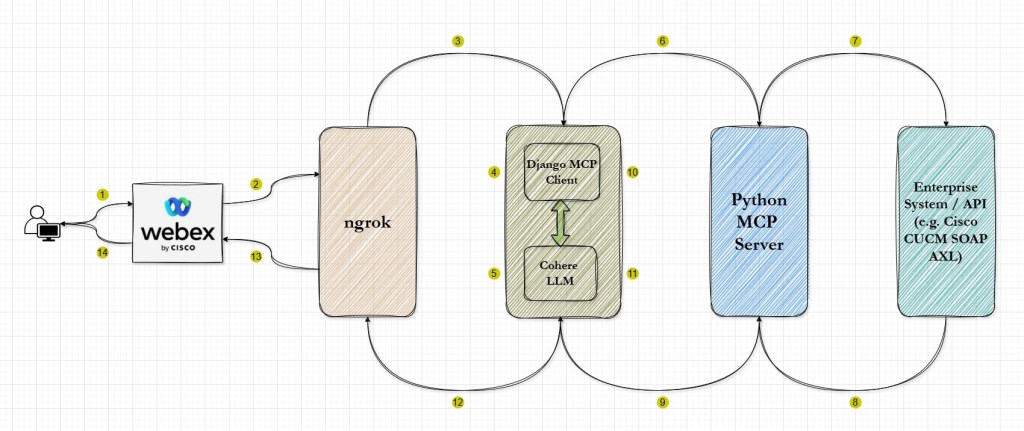
Important : This design mirrors the architecture used in Claude Desktop, where the reasoning step occurs in the client, while execution happens in a controlled server environment. By separating these responsibilities, we reduce security risk and maintain auditability.
Step 1 : Cisco Webex: User Interaction
Webex provides:
- Message input
- User context
- Conversation history
It does not:
- Decide what actions to take
- Access backend systems
- Execute logic
Important : This makes Webex ideal as a neutral interaction layer. Users communicate naturally, while all operational decisions are deferred downstream.
Step 2 : Webex Bot and Webhooks: Event Transport
The Webex bot is configured to emit webhook events whenever a message appears in a space it participates in.
These webhook events include:
- Message content
- User/Message identifiers
At this stage, the message is unprocessed – it is simply delivered as an event.
Step 3 : ngrok: Controlled Exposure of the MCP Client
During development, the Django MCP client runs locally. In order to expose that local Django dev server, we are using ngrok. It provides:
- A publicly reachable HTTPS endpoint
- Secure tunneling of incoming webhook requests
- Minimal setup overhead
Important : ngrok is not logically significant to the architecture. It merely enables Webex to reach the Django service. In production, this role would typically be replaced with an enterprise ingress solution.
Step 4 to 6 : Django MCP Client <–> LLM
The Django application acts as the decision gateway between conversation and computation. Its responsibilities include:
- Webhook Reception
- Accept incoming webhook POST requests from Webex app via ngrok
- Validate payload integrity
- LLM-Based Reasoning
- Sends text to Cohere LLM for intent parsing
- Receives tool name and argument structure
- MCP Server Invocation
- Calls the appropriate backend tool
- Ensures structured inputs and outputs
The MCP client also does the following but that happens in the return journey in step 9
- Receives structured tool output
- Converts tool output into a conversational reply with the help of Cohere LLM
- Posts back to Webex via the bot API
Important : Django MCP Client is merely acting as a coordinator at this stage. It’s not executing any business logic.
Step 7 & 8 : Python MCP Server: Deterministic Execution
The MCP server is implemented in Python and multiple tools. Each tool:
- Has a clear input schema and appropriate docstring
- Performs a specific backend operation on the Cisco CUCM system through functions associated with specific tools
- Returns structured, machine-readable results
Examples include:
- Querying CUCM for extensions without a voicemail profile
- Finding phones with more than 1 line by model
The MCP server:
- Owns credentials
- Enforces access boundaries
- Controls execution paths
Important : This design ensures that all backend interactions remain predictable and auditable. The Python functions being executed here are not behaving any differently than how they do when executed as standalone programs.
Step 9 to 11 : Django MCP Client <–> LLM
Now in the return journey, the Django MCP client :
- Receives structured tool output from the MCP Server
- Converts tool output into a conversational reply with the help of Cohere LLM
Step 12 & 13 : Django MCP Client <–> Webex
The Django MCP Client posts the final response which has been prepared with the help of Cohere LLM, back to Webex via the bot API. The reply will flow through the same ngrok tunnel.
Github Repo
You can download the code and follow the instructions given in the Read-Me file to run it in your own environment. Since the code is deliberately kept modular, you can even expand it to handle your own specific use cases.
https://github.com/simranjit-uc/cucm-mcp-llm
YouTube Video Tutorial
Since it’s not possible to go through each & every detail in the blog, I’ve created this explanatory video as well where I go through the demo as well. If you like this blog or the video then please subscribe to my channel there. That realy helps!!
I hope you found this post & video useful and you’re now ready to implement your own variants to tackle your specific use-cases. Please feel free to share your feedback/suggestions, if any.
Until then, Happy Learnings!!
 Learn UC Collaboration