
Over the past few years, LLMs have gone from being a novelty to something many of us actively use at work. They’re excellent at explaining concepts or summarizing documentation but there’s a hard limitation that anyone working in enterprise IT quickly runs into:
AI models don’t actually know anything about your environment.
They don’t know what’s configured in your network devices or enterprise applications like Cisco CUCM or any other application for that matter. At best, they can tell you how to check the configured things but someone still has to run the queries, log into these systems, export the data, and interpret the results. However, what most teams actually want is something closer to this :
Let me ask questions about my systems in plain English & have the AI pull real answers – safely & without exposing my infrastructure.
That’s the gap the Model Context Protocol (MCP) is designed to fill.
MCP provides a structured way to connect AI models to real systems through clearly defined interfaces without giving the model unrestricted access or embedding unwanted automation directly into prompts. Instead of the AI “doing things on its own,” MCP forces it to operate through tools that you explicitly define, control, and audit.
In this article, I’ll walk through what MCP servers are, how they work, and why they’re well-suited for enterprises running applications in a closed environment. I’ll then show how a standard LLM client like Claude Desktop can be used as an MCP client, and how a custom Python-based MCP server can act as a safe integration layer in front of Cisco’s Unified Communications Manager (CUCM).
To demonstrate MCP+AI model’s usefulness, we’ll look at the following two Cisco UC specific use cases. I am sure anyone who has ever had to audit Cisco UC environment before taking any major architectural design specific decisions would appreciate these use-cases. These use-cases are just a tip of the iceberg and only here to give you a glimpse and are by no means the only thing that can be acheieved using MCP + Gen AI models.
- Which phones have more than one line configured (optionally filtered by model)?
- Which extensions don’t have a voicemail profile assigned?
These are the kinds of questions that normally require a mix of SQL queries, CUCM knowledge, and a lot of manual effort. With the help of MCP & combining it with an LLM model, we can make this whole exercise very conversational without losing control over our environment. You can jump to relevant sections by clicking on the links below.
- The Problem MCP Solves
- What Is Model Context Protocol (MCP)?
- What Is an MCP Server?
- High-Level MCP-LLM-Enterprise App Communication Flow
- How MCP Works using Claude Desktop Client
- Building a MCP Server using Python
- Use Cases
- YouTube Video Tutorial
- Final Thoughts
The Problem MCP Solves
Traditionally, LLMs are nothing more than context driven inference engines. They broadly :
- Do not have direct access to your infrastructure
- Do not directly talk to enterprise applications
- Cannot safely run arbitrary scripts on enterprise systems
- Cannot maintain structured, audited tool access
This isolation is actually intentional. It protects users and organizations from many adverse situations including but not limited to :
- Prompt injection attacks
- Accidental actions caused by LLM hallucinations
- Data leakage
In a real enterprise environment (e.g Cisco Unified Communications), insight lives in places like :
- Application database
- Configuration tables
- Device inventories
- CDR databases
Without controlled access to these systems & their data, AI is reduced to:
- Giving advice without visibility into reality
- Explaining documentation
- Generating scripts that someone else must run independently
What enterprises actually want is something closer to :
Let the AI ask questions of my systems but only through interfaces I explicitly approve.
This is the exact design goal of MCP. MCP standardizes this interaction layer. It creates a clean connection between:
- The AI client (like Claude Desktop or your custom built client)
- Your tools, APIs, scripts, and enterprise systems
In fact, you may have already heard people saying that MCP is like a “USB-C for AI tools” – a universal, structured interface which sufficiently explains the versatility of MCP.
What Is Model Context Protocol (MCP)?
At its core, MCP is a standardized protocol that allows AI models to interact with external tools in a structured, controlled, and observable way.
In an MCP based environment, the responsibilities are typically split in the following manner :
| Component | Responsibility |
| LLM (Claude/Chat GPT/Cohere) | Reasoning, language understanding, decision-making |
| MCP Client | Managing protocol communication |
| MCP Server | Executing tools, enforcing boundaries, accessing systems |
What Is an MCP Server?
An MCP server is simply a process that:
- Exposes Tools (standard functions the AI can call)
- Exposes Resources (data the AI can read)
- Exposes Prompts (structured templates)
All communication follows the Model Context Protocol, which is:
- JSON-based
- Transport-agnostic (stdio, HTTP)
- Deterministic and auditable
The LLM AI never directly talks to CUCM, databases, or any enterprise application for that matter. It talks only to your MCP server. This separation is important because it prevents the AI/LLM from:
- “Inventing” capabilities
- Calling tools that don’t exist
- Executing logic outside your control
High-Level MCP-LLM-Enterprise App Communication Flow
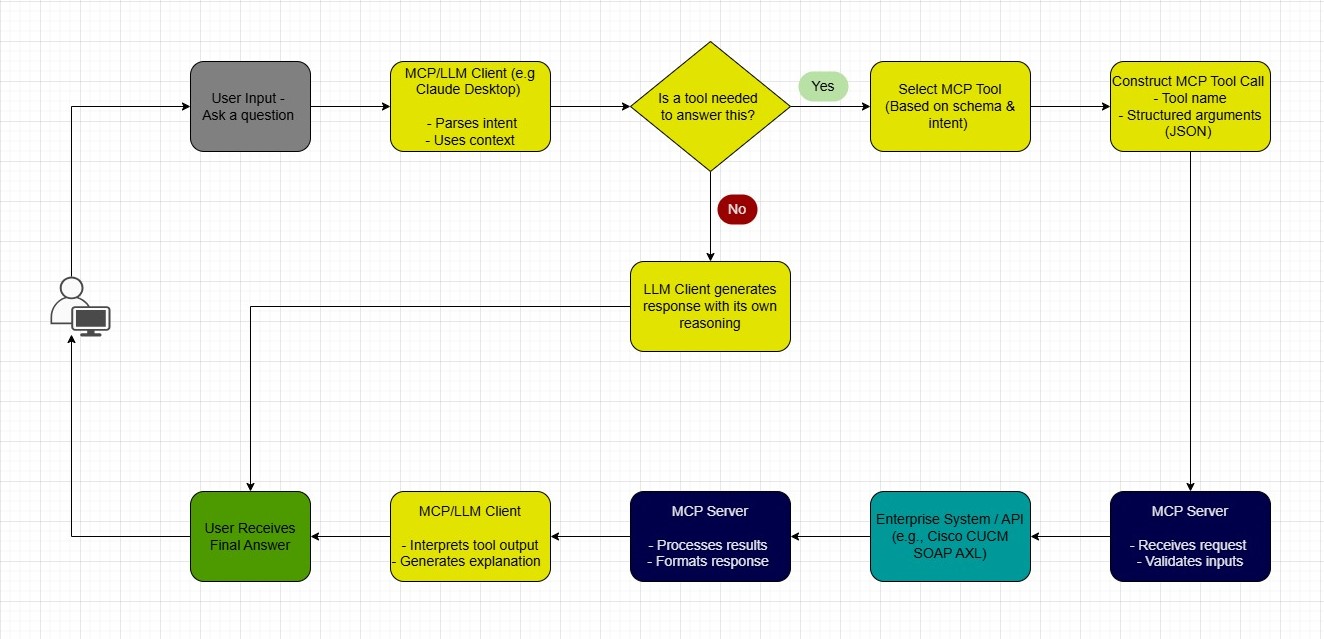
How MCP Works using Claude Desktop Client
Let’s walk through the full lifecycle.
Step 1: Claude Desktop Starts
Claude Desktop acts as an MCP client. On startup, it reads a configuration file that defines :
- Which MCP servers exist
- How to launch them
- How to communicate with them
Step 2: MCP Server Launches
Your Python MCP server starts as a normal process as a part of Claude Desktop’s startup. It :
- Registers itself
- Declares available tools
- Advertises schemas
At this point, Claude knows:
These are the exact things I am allowed to do.
Step 3: Capability Discovery
Claude builds an internal map :
- Tool names
- Required parameters
- Expected output
This is crucial because it allows the AI to:
- Decide when to use a tool
- Validate inputs before calling it
- Chain reasoning with tool results
Step 4: Natural Language –> Tool Invocation
When a user types:
“How many Cisco 8841 phones have more than one line.”
Claude:
- Parses intent
- Matches intent to a known tool
- Constructs a structured MCP request
- Sends it to the MCP server
The AI is no longer guessing. It is operating against a known agreement between itself & the tools exposed by the MCP server .
Step 5: Controlled Execution
Your MCP server:
- Authenticates with the enterprise application like Cisco CUCM
- Executes queries
- Applies business rules
- Formats results
Claude never sees:
- SOAP AXL communication between the MCP Server tools and CUCM APIs
- CUCM credentials
- API logic
Step 6: Structured Response –> Explanation
Claude receives the raw response from the MCP server. It then:
- Interprets the data
- Summarizes it
- Explains it in human-friendly language
Building a MCP Server using Python
A Python MCP server typically includes:
- Tool definitions
- Input validation
- Business logic
- Output formatting
from fastmcp import FastMCP
from get_Phone import getPhone
from get_VM import getVM

mcp = FastMCP("cucm-mcp-server")

@mcp.tool()
async def lookup_phone_tool(device_model: str) -> str:
    """
    Look up line/extension details by device model.

    Args:
        device_model (str): e.g., "Cisco 8851", "Cisco 8861", "Cisco 8841"

    Returns:
        str: MAC address. e.g "SEP001BDC123456"
        str: Number of lines associated with the above phone MAC address. e.g 1, 2, 3 and so on
    """
    return getPhone(device_model)


@mcp.tool()
async def lookup_vm_tool():
    """
    Look up line/extensions which have no voicemail profile assigned to them.

    Args:
        There are no arguments

    Returns:
        str: 4-digit extension like 1100, 7019 etc
    """
    return getVM()


if __name__ == "__main__":
    mcp.run()
Behind each tool is where your real logic lives. As you can see in the above example, each tool is referencing its own function.
- The first function getPhone(device_model) is taking “device_model” as an argument
- The second function getVM() is working without an argument
Let’s explore these functions in detail with respect to our use cases as they are the ones who are handling the actual logic.
Use Cases
Use Case 1 – Find Phones with More Than One Line in Cisco CUCM
Problem
In large environments, phones may be configured with :
- Shared lines
- Multiple appearances
- Incorrect provisioning
You want to know :
- Which phones have more than one DN
- Optionally filtered by model (e.g., Cisco 8861, 8841)
Manually identifying these requires :
- Complex SQL
- Exporting reports
- Manually post-processing data
MCP Tool Design
from zeep import Client
from zeep.transports import Transport
from requests import Session
from requests.auth import HTTPBasicAuth
from urllib3 import disable_warnings
from urllib3.exceptions import InsecureRequestWarning
import os, json
from pathlib import Path


def getPhone(device_model : str):
    disable_warnings(InsecureRequestWarning)
    BASE_DIR = Path(__file__).resolve().parent
    CONFIG_PATH = BASE_DIR / "config.json"
    with open(CONFIG_PATH, "r") as file:
        data_JSON = json.load(file)
        username = data_JSON["uname"]
        password = data_JSON["pwd"]
        host = data_JSON["host"]

    wsdl = r"D:/axlsqltoolkit14/schema/current/AXLAPI.wsdl"
    location = f"https://{host}:8443/axl/"
    binding = "{http://www.cisco.com/AXLAPIService/}AXLAPIBinding"

    session = Session()
    session.verify = False
    session.auth = HTTPBasicAuth(username, password)

    transport = Transport(session=session, timeout=20)
    client = Client(wsdl=wsdl, transport=transport)
    service = client.create_service(binding, location)

    try:
        resp = service.listPhone(searchCriteria= {'name': "SEP%"}, returnedTags={'name': '', 'model': ''})

        phone_Dict = {'phone_MAC' : [], 'phone_Model' : []}
        phone_MAC_List = []
        phone_MAC_all_List = []
        phone_multiple_lines = []

        for i in range(0, len(resp['return']['phone'])):
            phone_MAC = resp['return']['phone'][i]['name']
            phone_Model = resp['return']['phone'][i]['model']
            phone_Dict['phone_MAC'].append(phone_MAC)
            phone_Dict['phone_Model'].append(phone_Model)

        model_Count = 0
        for a in range(0, len(phone_Dict['phone_MAC'])):
            if phone_Dict['phone_Model'][a] == device_model:
                phone_MAC_List.append(phone_Dict['phone_MAC'][a])
                model_Count += 1

            if device_model == "all":
                phone_MAC_all_List.append(phone_Dict['phone_MAC'][a])


        if len(phone_MAC_List) > 0:
            for b in range(len(phone_MAC_List)):
                resp_2 = service.getPhone(name = phone_MAC_List[b], returnedTags = {'name' : '', 'description' : '','model' : '', 'lines' : {'line' : {'dirn' : {'pattern' : ''}}}})
                if len(resp_2['return']['phone']['lines']['line']) > 1:
                    phone_multiple_lines.append(phone_MAC_List[b])
        else:
            for c in range(len(phone_MAC_all_List)):
                resp_3 = service.getPhone(name=phone_MAC_all_List[c], returnedTags={'name': '', 'description': '', 'model': '',
                                                                                'lines': {
                                                                                    'line': {'dirn': {'pattern': ''}}}})
                if len(resp_3['return']['phone']['lines']['line']) > 1:
                    phone_multiple_lines.append(phone_MAC_all_List[c])
        return f"{str(phone_multiple_lines)} have more than 1 line"

    except:
        return "The API request to CUCM failed"
How Claude Uses It
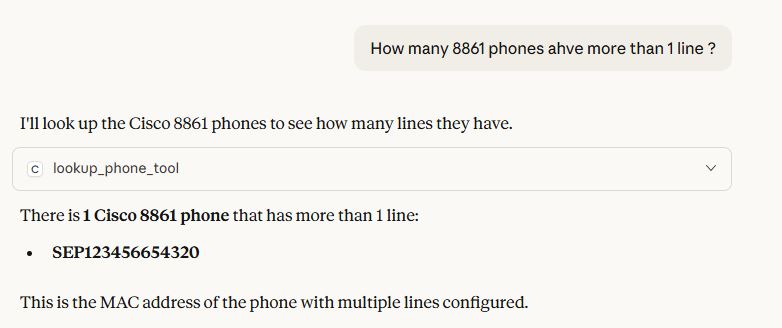
User prompt in Claude Desktop:
“How many 8861 phones have more than one line.”
Claude:
- Detects intent
- Calls MCP tool with
device_model="Cisco 8861" - Receives structured results
- Explains findings in plain English
Example response:
There is 1 Cisco 8861 phone that has more than 1 line:
- SEP123456654320
This is the MAC address of the phone with multiple lines configured.
Use Case 2 – Find Extensions Without Voicemail Profiles
Problem
In Cisco CUCM + Unity Connection environments:
- Lines/DNs may exist without appropriate voicemail profiles
- Audits are painful and doing it manually is tedious and error-prone
You want:
- A list of extensions that have no voicemail profile assigned
MCP Tool Design
import json
from zeep import Client
from zeep.transports import Transport
from requests import Session
from requests.auth import HTTPBasicAuth
from urllib3 import disable_warnings
from urllib3.exceptions import InsecureRequestWarning
from pathlib import Path


def getVM():
    disable_warnings(InsecureRequestWarning)
    BASE_DIR = Path(__file__).resolve().parent
    CONFIG_PATH = BASE_DIR / "config.json"
    with open(CONFIG_PATH, "r") as file:
        data_JSON = json.load(file)
        username = data_JSON["uname"]
        password = data_JSON["pwd"]
        host = data_JSON["host"]

    wsdl = r"D:/axlsqltoolkit14/schema/current/AXLAPI.wsdl"
    location = f"https://{host}:8443/axl/"
    binding = "{http://www.cisco.com/AXLAPIService/}AXLAPIBinding"

    session = Session()
    session.verify = False
    session.auth = HTTPBasicAuth(username, password)

    transport = Transport(session=session, timeout=20)
    client = Client(wsdl=wsdl, transport=transport)
    service = client.create_service(binding, location)

    dn_List = []
    dn_Dict = {"result" : dn_List}

    try:
        resp = service.listLine(searchCriteria= {'pattern': "%"}, returnedTags={'pattern': '', 'routePartitionName': '', 'voiceMailProfileName' : ''})
        print(len(resp['return']['line']))


        for i in range(len(resp['return']['line'])):
            if resp['return']['line'][i]['voiceMailProfileName']['_value_1'] == None:
                print(f"The extension without a valid VM profile is {resp['return']['line'][i]['pattern']}")
                dn_List.append(resp['return']['line'][i]['pattern'])
        print(len(dn_List))
        print(dn_List)
        return dn_Dict

    except:
        return "The API request to CUCM failed"
How Claude Uses It
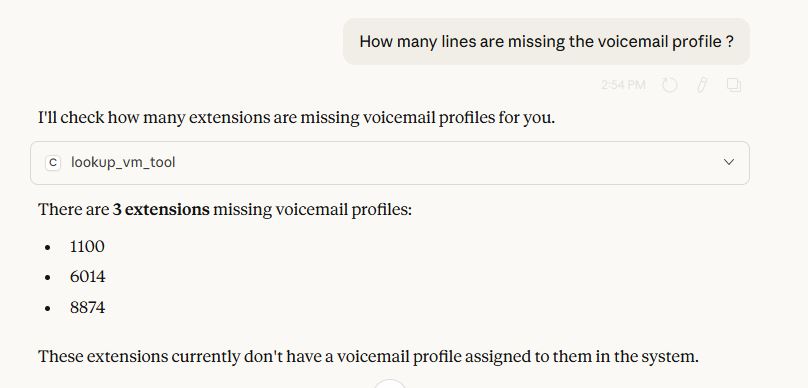
User prompt in Claude Desktop:
“How many lines are missing the voicemail profile ?”
Claude:
- Detects intent
- Calls MCP tool
- Receives structured results
- Explains findings in plain English
Example response:
There are 3 extensions missing voicemail profiles:
- 1100
- 6014
- 8874
These extensions currently don’t have a voicemail profile assigned to them in the system.
YouTube Video Tutorial
If you are someone who prefers a video tutorial then you can also check out the following video. Please also subscribe to this channel while you are there. That’d help a lot!!
Final Thoughts
MCP servers represent a fundamental shift in how we integrate AI with enterprise systems. The idea that one day we would be able to augment business operations using LLMs on applications/systems that are considered legacy today and were developed before terms like AI/LLM even came into existence, would have been laughable until a year ago. But not anymore!!
By combining:
- MCP Clients like Claude Desktop or custom built clients
- MCP servers
- Cisco CUCM APIs
We can unlock:
- Conversational audits
- Self-service data insights
- Safer, faster automation
This was just a tip of the iceberg. The possibilities are endless. I’ve personally helped a few of my customers with almost a dozen of their use cases using custom built MCP clients (more on that in later posts), servers and LLMs. I can only imagine what future iterations of this technology are going to bring to the table.
I hope you found this post useful and you’re now ready to implement your own variants to tackle your specific use-cases. Please feel free to share your feedback/suggestions, if any.
Until then, Happy Learnings!!
 Learn UC Collaboration